GTX Update Registry
GTXRaster CAD Series was installed but the machine users do not see the program
On a computer that has multiple users logging in to run GTXRaster CAD, an installation adjustment must be made for each user after the initial GTX installation.
The symptoms would be:
- Lack of a GTXRaster CAD desktop icon
- No evidence of the GTX program in an AutoCAD session (can’t run GINFO command)
- User will get an Unknown command error.
Solution : Run the “Registry Update”
Once GTX has been installed, re-running the original installer or running the Change/Uninstall option from the list of installed programs will allow running the registry update option (see image below).
How to access the Registry Update in the Windows installed program list:
- Windows 11 & 10 : Control Panel : Programs and Features
- Windows 8 : Control Panel : Programs : Programs and Features
- Windows 7 : Control Panel : Programs and Features
- Windows XP : Control Panel : Add or Remove Programs
Select the GTXRaster CAD/GTXImage CAD program choice.
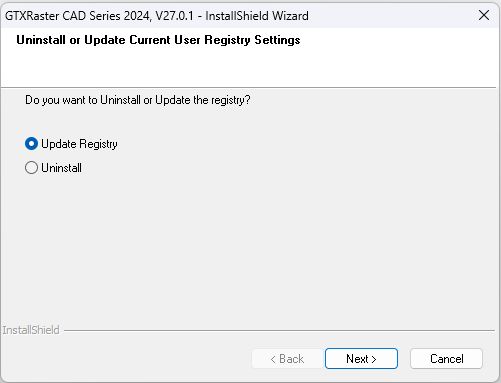
Note that using Run As Administrator will update the administrator account and not the current user.
If the current user does not have Windows permission to access the GTXRaster CAD installer in the Windows installed program list then try running the original downloaded installer program (setup.exe).
If needed, an administrator can temporarily elevate permissions as a normal user login to run the GTXRaster CAD installer using the DOS “runas” command:
runas /user:DOMAIN\USER setup.exe
Once you have completed the update registry function, the installer will create the GTX profile for the current user in the registry on the PC in HKEY_CURRENT_USER
Details:
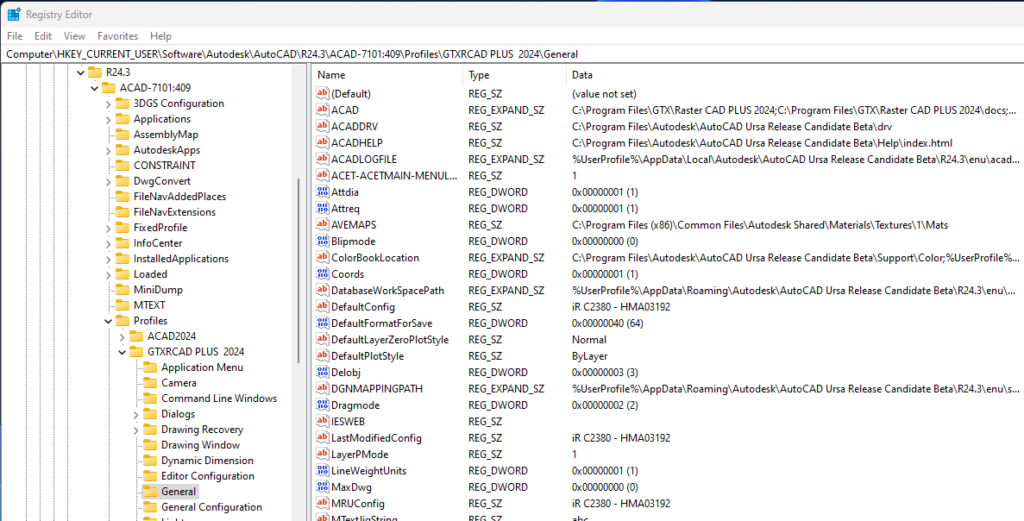
The GTX program installation will initially be installed by a user with administrator privileges. Completion of the installation will result in Windows Current_User registration of an AutoCAD profile for GTX for the privileged installer as in this example of a registry key for GTXRaster CAD Plus 2024.
HKEY_CURRENT_USER\Software\Autodesk\AutoCAD\R24.3\ACAD-7101:409\Profiles\GTXRCAD PLUS 2024
The Current_User registration must be initiated for other users logging into the GTXRaster CAD machine. This process requires a run of the GTXRaster CAD installation program as each user is logged into the computer. The installation will detect that the program has been installed and will display the following options window allowing for the Update Registry choice to complete Current_User registration and creation of a GTX desktop icon.